Discover
Why not try something different?
Why use Typst?
Why? LaTeX is great, isn't it?
What is Typst?
Pronounced /taɪpst/, Typst is a typesetting system for scientific and technical documents designed as an alternative to LaTeX. Released in early 2023, Typst offers an intuitive and readable syntax, similar to modern languages (a sort of blend of Markdown and LaTeX). For more details on its history, see the Typst Wikipedia page.
Whether or not Typst is superior is a matter of debate (search for “Typst vs LaTeX” to see for yourself), largely because Typst is a recent development. It may therefore not (depending on your use) allow you to completely replace LaTeX. There are, however, numerous packages and templates available here: https://typst.app/universe/search/, which offer solid alternatives to many LaTeX packages (such as cetz for TikZ). Conclusion: make up your own mind!
TypographiX templates
If you were planning to use the LaTeX template polytechnique for your internship report, why not try using Typst instead? You won't need much prior knowledge to get it done, thanks to the typographix-polytechnique-reports package. You can use this as an opportunity to see if Typst is right for you and perhaps even consider using it for other projects!
The templates offered by TypographiX will indeed allow you to easily create a document or slides in line with the École Polytechnique's graphic guidelines. The code, available on the following GitHub repository: https://github.com/remigerme/typst-polytechnique, is currently maintained by Rémi Germe (X22).
#show link: underline
#show link: set text(fill: blue)

= Markup

- *Strong* and _normal_ emphasis
- Inline math: $a, b in { 1/2, sqrt(4 phi) }$
- Block math:

$ => beta + sum_(i=0)^nabla Q_i / 2 <= 2 $

But that's just the surface! Go from _absolute beginner_ to Typst-proficient in *30 minutes* with the #link("https://typst.app/tutorial")[tutorial].
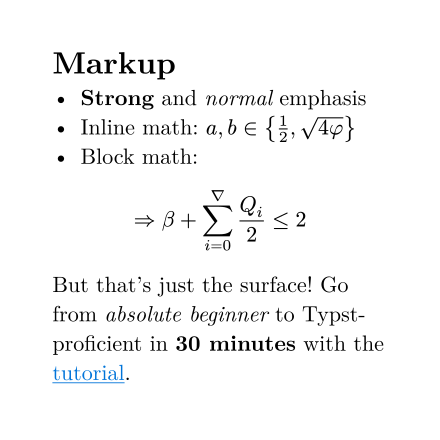
Typst example
Quick start
Or how to start and finish a document in an hour.
Use the web app
The Typst website offers an online editor similar to Overleaf. It also offers subscription plans. However, the free plan is more than adequate and also allows you to collaborate online with your classmates. To do this:
- Create an account at https://typst.app.
- Once logged in, click on one of the two links below, then on
Create project in app. Choose a project name and start writing!
You can also create a project from a template on https://typst.app. To do this, click on Start from template, search for polytechnique, then choose the reports or slides template.
Using the open source compiler
The Typst compiler is open source. To use it:
- Follow the official installation instructions: https://typst.app/open-source/#download.
- If you're working in VS Code, consider installing the Tynimist extension. It will make your life much easier.
- Create your project with
typst init @preview/typographix-polytechnique-reports:0.1.6ortypst init @preview/typographix-polytechnique-slides:0.2.0. Please note that the versions listed here may not be up to date. The command to run is otherwise indicated on the pages below:
Learn to write with Typst
Because you have to start somewhere.
Are you feeling lost and not sure where to start? Start by following these tutorials: